
Table of Contents
Etisalat Quick Pay gives e& UAE customers a direct way to pay eligible telecom bills online. You can use it when you want to make a payment without going through the full account-management process.
Etisalat now operates under the e& UAE brand, but many people still search for “Etisalat Quick Pay” when they want to pay a mobile, fixed-line, or eLife bill. This guide explains how Quick Pay works, what information you need, which services you can pay for, current price references, and what to do when a payment fails or stays pending.
What Is Etisalat Quick Pay?
Etisalat Quick Pay is an online payment service from e& UAE. It provides a direct payment route for eligible services and can be useful when you already know the account details and only need to make a payment.
You do not need to use all the account-management features just to make a payment. Quick Pay focuses on the transaction, while the e& UAE app and online account provide wider access to bills, account information, and service management.
e& UAE also provides other payment channels, including its website, mobile app, banks, payment machines, exchange houses, Autopay, and telephone payment options.
How Does Etisalat Quick Pay Work?
Quick Pay follows a straightforward process. You open the official e& UAE payment service, enter the information requested for your service, check the payment amount, and complete the transaction using an accepted payment method.
Before submitting the payment, check the account information and amount carefully. The payment process includes a confirmation stage so you can review the transaction before completing it.
After a successful transaction, Quick Pay can provide a confirmation message and transaction ID. The official confirmation process also states that customers receive a confirmation SMS after the payment is received.
How to Pay Your Etisalat Bill Using Quick Pay
You can follow these steps when paying an eligible e& UAE bill online.
Step 1: Open the Official Quick Pay Page
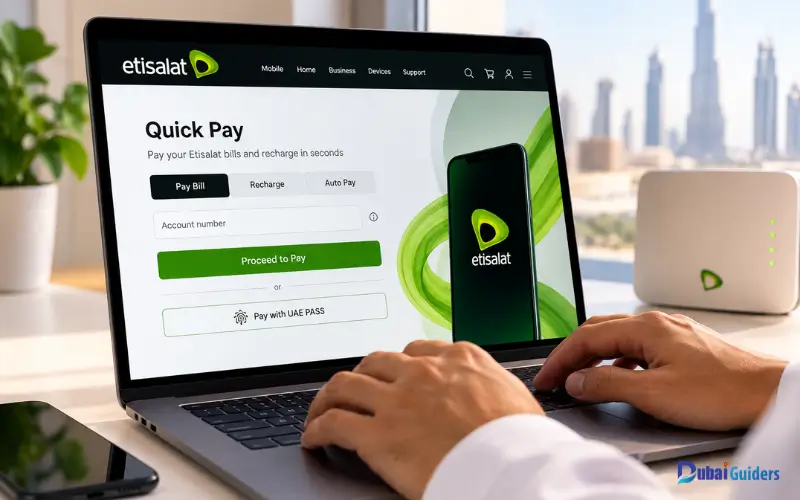
Start from the official e& UAE website or its official online payment service. Avoid entering your account or card details on websites that do not belong to e& UAE.
Always check the website address before entering sensitive information. This simple step can help you avoid fake payment pages.
Step 2: Enter Your Account Details
Enter the account information requested on the Quick Pay page. The required details can differ depending on the type of service you want to pay for.
Check every digit before continuing. A small mistake in an account number can send the payment to the wrong account or prevent the transaction from completing.
Step 3: Check the Amount
Review the amount displayed by the payment system before making the payment.
If the amount does not match what you expect, stop and check the account details. Do not continue until you are sure that you are paying the correct service.
Step 4: Enter Your Card Details
Use an accepted debit or credit card and provide the information requested by the payment page.
Your bank may ask you to complete an additional security check, such as an OTP or another verification step. Complete this verification only through the legitimate payment and banking screens.
Step 5: Submit the Payment
Check the account number and amount one more time before submitting the transaction.
After you submit the payment, wait for the result. Avoid repeatedly refreshing the page because this can make it harder to determine whether the first transaction succeeded.
Step 6: Save the Confirmation
If the payment succeeds, save the confirmation page and transaction ID.
e& also states that a confirmation SMS follows a successful payment. Keep the message and transaction details until the payment appears correctly on your account.
What Do You Need for Etisalat Quick Pay?
The information required depends on the service and the payment page. It is useful to have the following details ready before starting:
| Requirement | Purpose |
| e& or Etisalat account details | Identifies the service |
| Account number or requested service information | Links the payment to the correct account |
| Payment amount | Confirms the amount you want to pay |
| Debit or credit card | Completes the card transaction |
| Internet connection | Opens and uses the online payment service |
| Transaction details | Helps you track the payment later |
Do not rely on old instructions if the payment page asks for different information. Follow the fields shown on the current official e& UAE payment service.
Can You Pay an Etisalat Bill Without Logging In?
Yes. Quick Pay is designed to provide a direct payment route for eligible transactions without requiring the full account-management process.
This makes it different from the e& UAE app. If you only need to pay a bill, Quick Pay can be more direct. If you want to view previous bills, check account information, manage services, or review detailed charges, the e& UAE app provides more account features.
Which Etisalat Services Can You Pay Through Quick Pay?
e& UAE provides Quick Pay as one of its payment channels for eligible telecom services. Its billing information includes mobile phone, fixed-line, and eLife bills.
The exact services available through the payment page can change, so check the current options shown by e& when you start a transaction.
Mobile Bills
You can use an available e& payment channel to settle an eligible mobile bill.
Postpaid customers pay the amount shown on their bill. Prepaid customers normally recharge their balance instead of paying a monthly postpaid bill.
Fixed-Line Bills
e& UAE also provides payment options for fixed-line services. Enter the correct service information and confirm the amount before completing the transaction.
eLife Bills
e& UAE supports bill payments for eligible eLife services through its payment channels. If you need to pay an eLife bill, enter the account information requested by the current payment page and check the amount before submitting it.
Etisalat and e& UAE Service Prices
Quick Pay itself should not be confused with the price of an e& service. You pay the amount due on your account or the recharge amount you select. Your actual bill depends on your plan, package, add-ons, usage, and any current promotion.
Here are useful current price references from e& UAE:
| Etisalat/e& Service | Latest Starting Price | Payment Type |
| Postpaid Mobile | From AED 100/month | Monthly bill |
| Prepaid Mobile | From AED 30/month | Recharge / plan |
| Home Internet | From AED 287/month | Monthly bill |
| Home Wireless | From AED 229/month | Monthly bill |
| Visitor Line | From AED 49/month | Prepaid/mobile plan |
| Home Wi-Fi Zone | From AED 29/month | Monthly add-on |
| Wasel Data Add-on | From AED 3.15 | Recharge/add-on |
| e& Bill Payment | Amount shown on your bill | Quick Pay |
The official e& UAE website currently lists postpaid plans from AED 100/month, prepaid plans from AED 30/month, Home Plans from AED 287/month, Home Wireless from AED 229/month, and Visitor Lines from AED 49/month.
For prepaid services, e& identifies Wasel Prepaid, Wasel Flexi, Visitor Line, Five Prepaid, and Emirati Wasel as separate prepaid services. Their charges depend on the applicable plan or service rather than one universal price.
This means you should not assume that a fixed amount applies to every e& customer. Check your current package or account before making a payment.
You Also Like: Etisalat Number Check: How to Know Your Etisalat Number in UAE
How to Pay an Etisalat Mobile Bill Online
Open the official e& UAE payment service and enter the requested mobile account details. Review the account and amount before entering your card information.
After submitting the transaction, wait for the confirmation result. Save the transaction ID and confirmation SMS if you receive one.
If you manage several mobile accounts, double-check the number before paying. This is especially important when you are paying a family member’s or another person’s account.
How to Pay an Etisalat Internet or eLife Bill Online
You can use an available e& UAE payment service to pay an eligible home internet or eLife bill. Open the official payment page, enter the requested account details, review the amount, and complete the payment using the available payment method.
Do not confuse an eLife bill with prepaid mobile recharge. An eLife payment settles a home-service account, while a prepaid recharge adds credit to a mobile service.
Can You Pay Someone Else’s Etisalat Bill?
Yes. e& UAE’s billing information allows customers to make payments for another person through its available payment channels. If you are paying someone else’s account, ask for the correct account information before starting. Check the account number again on the payment confirmation screen. Keep the transaction ID after payment. It provides a useful reference if the payment later needs to be checked.
What Payment Methods Does Etisalat Quick Pay Accept?
Quick Pay supports card-based online payment. Depending on the current payment page and transaction type, you may be asked to use a debit or credit card.
Payment rules can change, so always follow the options displayed during checkout. Do not rely on an old third-party article if the official e& UAE page shows different payment instructions.
e& UAE also offers other payment channels outside Quick Pay, including the e& UAE app, online services, banks, payment machines, exchange houses, Autopay, and telephone payment options.
How Can You Check Your Etisalat Bill Before Paying?
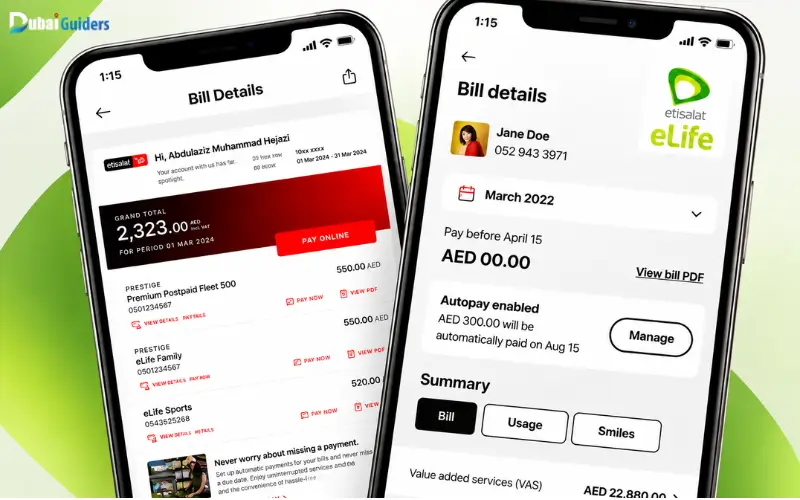
If you want to see detailed billing information before paying, the e& UAE app can be more useful than Quick Pay. e& provides access to bills and previous billing information through its digital services. The app can also provide billing details for eligible accounts.
Quick Pay mainly focuses on making the payment. If you need to understand why your bill changed, review previous bills, or manage your service, use the e& UAE app or online account.
How Do You Know If Your Etisalat Quick Pay Payment Was Successful?
A successful transaction should provide a payment confirmation and transaction reference. The Quick Pay confirmation process can show a transaction ID, while e& states that customers receive a confirmation SMS after a successful payment.
Keep the transaction ID until the payment appears correctly on your account. You can also check your bank or card transaction history to confirm that the amount was processed. If your bank shows a completed transaction but the e& account has not updated, do not immediately make another payment. First check the status of the original transaction.
What Should You Do If Etisalat Quick Pay Payment Fails?
A failed transaction can happen for several reasons. The issue may involve the account information, card, bank verification, internet connection, or payment system.
Start by checking the account number and payment amount. If your bank declined the card, check whether online transactions are enabled and whether your bank requires additional verification.
If the payment page displays an error, check your internet connection and try again later. Always use the official e& UAE payment page.
If your bank already deducted the money, do not immediately pay again. Keep the bank transaction reference and Quick Pay information and check the first payment’s status.
What If Your Etisalat Payment Is Pending?
A pending payment needs careful handling because your bank and the e& billing system may not update at the same time.
First, check whether the payment page provided a transaction ID or confirmation. Then check your bank transaction history.
Do not make another payment until you know what happened to the first transaction.
Keep these details ready if you need support:
- Account number
- Payment amount
- Payment date
- Transaction ID
- Bank reference
- Screenshot of the payment result
These details can help identify the transaction.
How Can You Get an Etisalat Payment Receipt?
After completing a Quick Pay transaction, save the confirmation page and transaction ID.
e& states that a confirmation SMS follows a successful payment. Keep the message as an additional record.
If you need detailed billing records, use the e& UAE app or online account to access available bill information.
Etisalat Quick Pay vs e& UAE App
Quick Pay and the e& UAE app serve different purposes.
| Feature | Quick Pay | e& UAE App |
| Online bill payment | Yes, for eligible payments | Yes |
| Full account login | Not required for eligible Quick Pay payments | Required for account access |
| View account information | Limited | Yes |
| View bills | Limited payment information | Yes |
| Previous bills | Not the main purpose | Available |
| Service management | Limited | Yes |
| Detailed billing information | Limited | More available |
| Quick payment | Main purpose | Available |
Use Quick Pay when you mainly want to make an eligible payment. Use the e& UAE app when you need broader account information or service management.
Is Etisalat Quick Pay Safe?
Use the official e& UAE website or payment service when making a Quick Pay transaction.
Check the website address before entering your account or card information. Avoid payment links sent through unknown emails, messages, social media accounts, or unfamiliar websites.
Never give another person your card PIN, online banking password, or OTP. Banks and legitimate payment processes do not require you to share these security details with another person.
Keep your transaction reference after making a payment. It can help you investigate a problem later.
Can You Use Etisalat Quick Pay From Outside the UAE?
You may be able to make an eligible payment online while outside the UAE, but the transaction can depend on your card, bank, account, and the payment rules displayed by e&.
Your card issuer may have separate rules for online or international transactions. Check your bank’s requirements if the payment does not go through.
Do not assume that every foreign-issued card will work. Follow the payment options and restrictions shown by e& UAE during checkout.
Etisalat Quick Pay for Prepaid and Postpaid Users
Prepaid recharge and postpaid bill payment are not the same thing.
Postpaid Payment
A postpaid customer receives a bill for the applicable billing period. The customer pays the amount due through a supported payment channel.
The amount depends on the selected plan, usage, add-ons, and other applicable charges.
Prepaid Recharge
A prepaid customer adds credit to the account rather than paying a regular postpaid bill.
e& identifies Wasel Prepaid, Wasel Flexi, Visitor Line, Five Prepaid, and Emirati Wasel as prepaid services. The applicable charges depend on the selected service and plan.
This difference matters when searching for an Etisalat payment service. If you want to add credit, look for the recharge option rather than a postpaid bill payment option.
Common Etisalat Quick Pay Problems
| Problem | What You Should Check |
| Wrong account details | Check the account number before submitting |
| Card declined | Check the card, available limit, and bank verification |
| Payment page not loading | Check your internet connection and try again |
| Payment pending | Check the original transaction before paying again |
| Money deducted but bill not updated | Keep the transaction reference and contact support if needed |
| No confirmation | Check the payment result and bank transaction |
| Wrong amount | Stop and verify the account details |
| Receipt missing | Keep the transaction ID and confirmation SMS |
Do not make repeated payments simply because the account balance has not changed immediately. First determine whether the original transaction succeeded, failed, or remains pending.
Etisalat Quick Pay Customer Support
If you cannot resolve a payment issue online, use the official e& UAE customer support channels.
Have your account details and payment information ready before contacting support. Useful information includes the account number, payment amount, transaction date, transaction ID, and bank reference.
Providing these details can make it easier to identify the transaction.
e& UAE also provides telephone payment options. Check the current official billing information for the available telephone payment route before calling.
Tips for Using Etisalat Quick Pay
A few simple checks can help prevent payment problems:
- Use the official e& UAE payment page.
- Check the account number before paying.
- Confirm the payment amount.
- Use an accepted debit or credit card.
- Complete any bank verification step.
- Save the transaction ID.
- Keep the confirmation SMS.
- Never share your OTP or card security information.
- Do not make another payment while the first transaction is unclear.
- Use the e& UAE app when you need detailed billing information.
- Check the current plan price before assuming that an old price still applies.
Must Visit: Al Awir Immigration Dubai: Location, Timings, Services and How to Reach
RTA Customer Happiness Center | Locations, Timings, Services and Contact
Frequently Asked Questions
What is Etisalat Quick Pay?
Etisalat Quick Pay is an online e& UAE payment service for eligible telecom bills and payments. It provides a direct way to make a payment without using the full account-management process.
How can I pay my Etisalat bill online?
Open the official e& UAE Quick Pay service, enter the requested account information, check the amount, provide your accepted card details, and complete the transaction. Save the confirmation and transaction ID after payment.
Can I pay my Etisalat bill without logging in?
Yes. Quick Pay provides a direct payment option for eligible transactions without requiring the full account-management process.
What should I do if my Etisalat payment fails?
Check your account details, payment amount, card status, internet connection, and any bank verification request. If your bank already deducted the money, do not make another payment until you confirm the status of the first transaction.
How can I check whether my Etisalat payment was successful?
Check the Quick Pay confirmation screen and transaction ID. e& also states that a confirmation SMS follows a successful payment, so keep the message and transaction details for your records.